Showing posts with label rss. Show all posts

Tuesday, May 22, 2007

I [heart] RSS


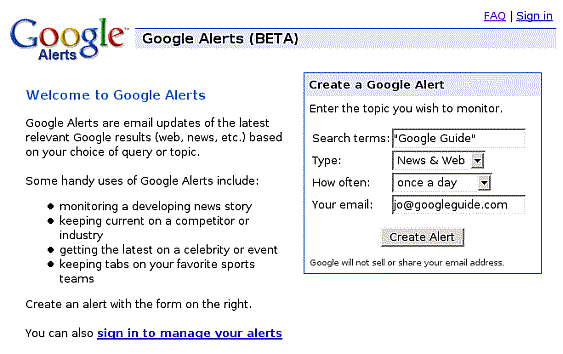
All right; I'm just diving in to this whole RSS thing... If you listen to podcasts on iTunes, you probably are loving RSS as well (whether you knew it or not). If you are in iTunes, and you click "subcribe" to a podcast, or if you purchase a season pass for all the episodes of 'Lost,' then Apple puts a little RSS feed in your iTunes music library that automatically downloads new episodes or podcasts as they are created. Pretty cool stuff. I'm getting into it more and more with Bloglines (as I mentioned in a previous post), by subscribing to a bunch of different blogs and news sources, so when any of those sources or blogs publish new information, my Bloglines account reads the RSS feed, and downloads the updated information. Here's another step with RSS... it's Google Alerts. If you haven't used this yet, try it out. You can perform a Google search, and have Google send you an email alert monthly, weekly, or even daily, as new information on that search parameter is produced. At first, I thought this would be cool for me to do a search for "educational technology" and so everyday, Google sends me an email with a list of all the news stories, websites, or blogs mentioning those terms. I got to thinking about other applications for this, and had some interesting conversations with friends who also use it. One buddy has a Google alert set for his name, so whenever anything is published with his name, he gets an alert. I did this, and got an alert from someone posting on a 'family reunion' website looking for long-lost relatives. Pretty interesting.

Then I got to thinking, 'this would have come in handy when I was searching to buy a bass guitar.' You could throw up an RSS Google alert search for "Fender Jazz Bass for Sale" and keep an eye out for any real good deals that come around. Another buddy checks Craig's List religiously, and found an $800 Wurlitzer for $50. If you don't have the time or the diligence to constantly scour Craig's List or Ebay, RSS feeds and alerts can help keep you on top of the news. I'd be curious of any other ways you are using Google Alerts.

Wednesday, May 16, 2007

New type of literacy...


So, literacy is changing. This is something that's been coming up in my classes as we have talked about how schools, education, culture will be different in the future. One of the things that I've been chewing on is this new type of literacy. How many people actually read the newspaper anymore? I mean, gets the cup of coffee and in your bathrobe, dodges the paperboy's skyhook on the front porch. The WAY we read is changing. Print media (while never to disappear), is taking a big hit, and news providers are changing. I could go on an on about the Time Person of the Year, but I just wanted to talk about Bloglines.
Blogs and news servers are changing the way news is disseminated by the use of RSS technology. Don't be afraid: RSS essentially stands for 'really simple syndication.' It's a way for people to "subscribe" to a blog or news source and have the information sent to you in real time as information is produced. Bloglines.com is an aggregator which basically is a place that manages and holds all of your RSS feeds. It's great because, instead of daily having to remember which blogs and news websites and such you want to read, you just go to your one-stop (free) blogline account and it will let you navigate through your subscriptions. This comes in especially handy since some of my friends and family members will only post things on their blogs once in a blue moon, so instead of me checking back for something new all the time, my aggregator alerts me when something new comes up.
My father is astonished at how I am constantly spouting off the latest fantasy baseball news claiming that I must spend hours daily scouring baseball news sites. Perhaps there may be some truth to that, but it brings me back to this idea of how literacy is changing. You don't have to spend hours combing over volumes of information; you have to be able to find the relevant information efficiently and keep moving. I'll subscribe to my fantasy baseball news RSS feeds, and rather than reading the newspaper and box scores cover to cover, I peruse the headlines that interest me, get the information I need or want, and move on. In case my principal is reading this, NO I do NOT spend hours reading fantasy baseball news. Thank you.